

Salesforce support breaks down when every ticket lands with the same person. A password lockout, a failed Flow, and an Apex defect don’t need the same skill set, access level, or change process. A tiered model gives each issue a clear starting point and a clear path for escalation.
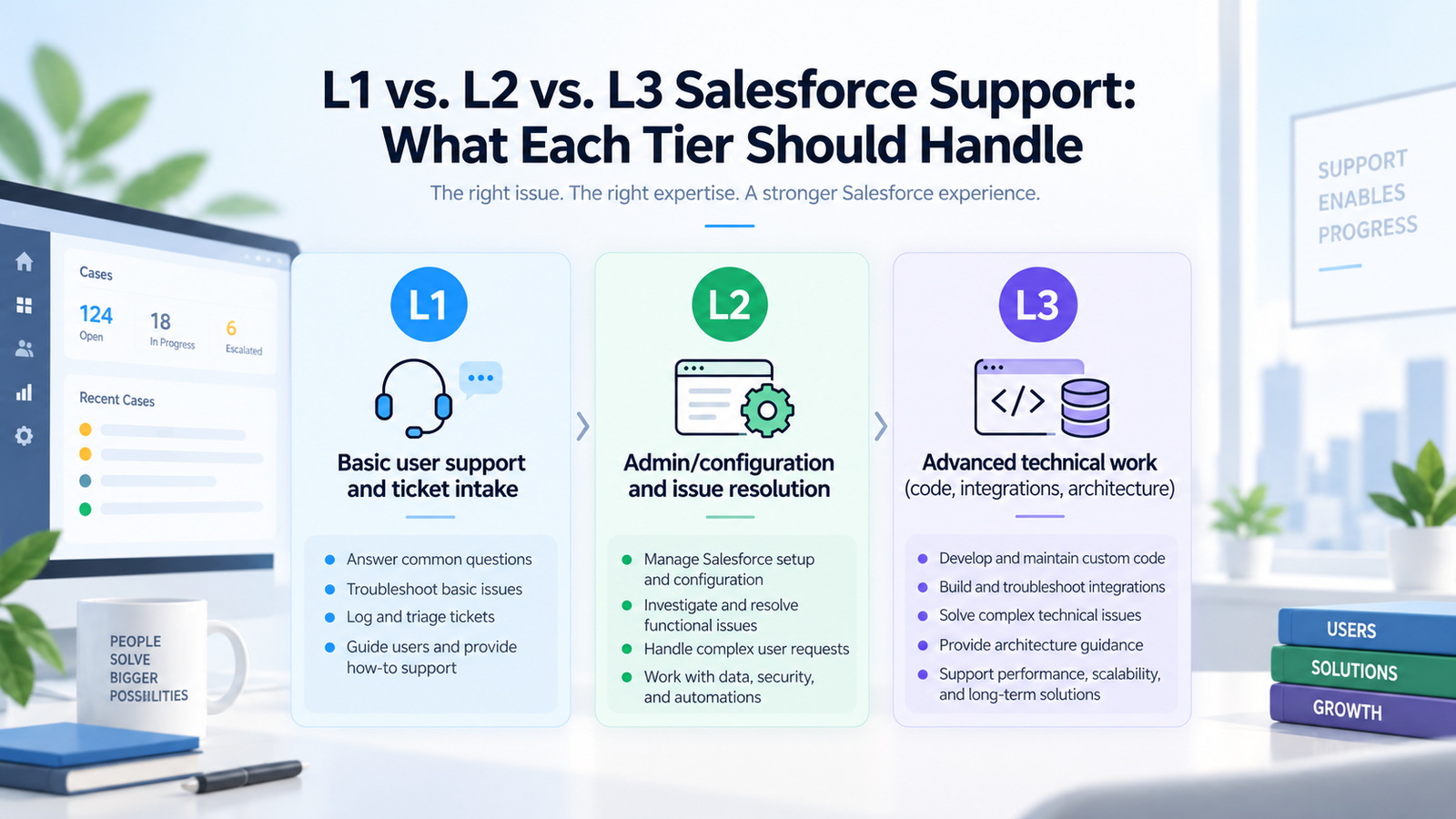
The practical value of Salesforce support tiers is ownership. L1 should resolve repeatable user and admin requests. L2 should investigate deeper configuration, automation, data, and integration problems. L3 should take work that needs code changes, architectural judgment, or a controlled production fix. The boundaries matter because poor routing raises resolution time and pulls senior specialists into work that a trained first-line team could close safely.
A strong support model also has to fit the org it serves. A small Sales Cloud setup with few integrations needs a different structure from a multi-cloud org with custom Apex, middleware, identity services, and regulated data. Advayan’s Salesforce support and maintenance services describe monitoring, incident handling, technical troubleshooting, and release work as related operating tasks, which is useful context when defining where each support level begins and ends. The goal is a model that resolves routine work quickly while protecting production from risky changes.
TL;DR
Salesforce support tiers work best when the dividing line is based on complexity, risk, and required access. L1 owns intake, basic user help, known fixes, and low-risk admin requests. L2 owns deeper functional and technical troubleshooting, including Flow failures, configuration conflicts, data issues, and many integration incidents. L3 owns code defects, difficult performance problems, architecture decisions, and changes that need developer or architect review.
The tier number doesn’t tell you how urgent an incident is. A critical outage can start at L1 for intake and move to L3 within minutes. Salesforce itself uses separate case severity levels for urgency, so internal teams should keep severity and support level as 2 different fields. Good routing also depends on runbooks, useful ticket notes, clear escalation rules, and access controls that match each team’s work.
What Salesforce Support Tiers Mean
Salesforce support tiers are an operating model for deciding who handles a ticket, what work that team may perform, and when the issue must move to a deeper skill level. Salesforce doesn’t impose a universal L1, L2, and L3 responsibility chart for customer organizations. Each company defines its own boundaries based on org design, risk, internal skills, support hours, and business needs.
The model becomes useful when the tiers are tied to work types instead of job titles. L1 can be an internal service desk, a Salesforce admin group, or part of a managed support team. L2 may include senior admins, business analysts, and platform specialists. L3 often includes developers, technical leads, and architects. The names matter less than the decision rights attached to them.
Salesforce’s own IT service guidance explains how service-level agreements and operational level agreements can divide commitments across teams. In its SLA and OLA guidance for IT services, Salesforce gives an example where L1, L2, and L3 have separate internal targets that together support the overall service commitment. Those example times aren’t universal targets, but the structure is useful: each tier needs a defined responsibility and a time limit for acting before a ticket stalls.
A practical model usually answers 5 questions for every ticket category:
· Who receives the ticket first?
· What checks must happen before escalation?
· What changes can that tier make in production?
· What evidence must be attached when the ticket moves?
· Who owns user communication while several teams work on the issue?
Those questions prevent the common “send it to the Salesforce team” pattern. They also make Salesforce managed services easier to govern because the client and provider can agree on the same routing rules before volume increases.
L1 Salesforce Support: Frontline Work and Simple Requests
L1 Salesforce support should handle high-volume issues that are repeatable, documented, and low risk. Its job is to restore user productivity fast without making changes that require deep technical analysis. L1 is also the intake point for incidents that will eventually move to L2 or L3, so ticket quality starts here.
Typical L1 work includes login guidance, account access resets, user activation or deactivation under an approved process, basic permission assignment, report access questions, simple record corrections, and “how do I” questions. It can also include basic checks for failed jobs or integrations when a runbook explains exactly what to verify and when to escalate.
A useful boundary appears in Advayan’s first-line service model. Its Salesforce L1 support scope draws a clear line between first-line tasks and deeper work. It places routine access, basic administration, record corrections, simple report changes, and initial platform checks at L1 while moving complex security design, new automation, custom integration work, and governor-limit debugging upward. The exact boundary can change by organization, but the principle is sound: L1 needs safe, repeatable actions with a known stop point.
What L1 should resolve
L1 can close a ticket when the issue matches a known pattern and the fix doesn’t require design judgment. Examples include a user who needs an approved permission set assignment, a standard report filter that was changed by mistake, a duplicate record that can be merged under an established rule, or a familiar browser and session issue covered by the knowledge base.
Access work deserves extra care. Salesforce explains that permission sets extend user access without changing the profile, and it recommends permission sets as a main way to manage added permissions. That doesn’t mean L1 should grant any requested access. The team should work from an approved catalog, verify the requester’s authority, and escalate requests that change the security model or expose sensitive data.
What L1 should escalate
L1 should stop when the ticket needs code review, complex configuration changes, cross-system diagnosis, or a decision about the underlying design. It should also escalate when the documented fix fails, when the same incident keeps returning, or when the impact is larger than the original ticket suggested.
Good L1 Salesforce support doesn’t hide uncertainty. The team should record what the user experienced, what changed recently if known, the exact error text, the affected records or users, and the troubleshooting already performed. That package lets L2 start analysis instead of repeating intake.
L2 Salesforce Support: Deeper Functional and Technical Resolution
L2 Salesforce support owns problems that need stronger platform knowledge but don’t automatically require a developer or architect. L2 is where many hard Salesforce incidents should be solved because experienced admins and technical specialists can inspect automation, configuration, security, data behavior, and integrations in more depth.
Common L2 work includes Flow failures, validation-rule conflicts, report type problems, queue and assignment behavior, permission interactions, duplicate or failed data loads, API authentication errors, middleware job failures, and configuration defects introduced by a recent change. L2 may also own small changes when governance allows them, such as updating an existing Flow, adjusting a validation rule, or correcting a mapping in a controlled environment.
Integration incidents are a major L2 category. A useful support team needs to distinguish between a Salesforce-side configuration issue, expired credentials, bad mappings, middleware errors, and failures in the remote system. Advayan’s Salesforce integration services cover API, middleware, event-based, and custom integration patterns, which reflects why integration support often needs more than basic admin access. L2 should be able to follow transaction IDs, inspect error queues, check endpoint settings, and identify which system owns the next action.
Flow and automation troubleshooting
Flows can fail because of bad input data, permissions, record-locking behavior, missing references, changed dependencies, or logic that doesn’t cover a specific path. L2 should reproduce the problem in a safe environment when possible and inspect the execution path before changing the Flow. Salesforce’s Flow Builder debugging guidance lets admins review the path a Flow takes and warns that debug runs can perform real data changes unless rollback mode is used. That makes test discipline part of support work, even for what looks like a small fix.
A recurring Flow failure may belong with L3 if the issue points to Apex actions, a wider automation design problem, or a need to refactor several dependent processes. L2’s job is to get far enough into the evidence to make that escalation precise.
When L2 owns the fix
L2 Salesforce support should usually keep the ticket when the root cause is within configuration, admin-managed automation, controlled data repair, or a known integration setting. It should pass the ticket to L3 when the fix needs custom code, a new integration pattern, a security redesign, a major data-model change, or an architectural decision that affects several parts of the org.
L3 Salesforce Support: Code, Architecture, and High-Risk Change
L3 Salesforce support handles the issues with the highest technical depth or change risk. The work often involves Apex, Lightning Web Components, custom APIs, complex integrations, performance analysis, data-model changes, or security decisions that can affect many users. L3 should also own defects where several layers interact and no single configuration change explains the failure.
This tier needs strong engineering discipline because the fastest production patch isn’t always the safest fix. L3 should reproduce the issue, identify the actual cause, assess related components, test the change, and plan deployment and rollback. When the issue involves custom development, Advayan’s Salesforce development services provide relevant context around Apex, Lightning, data migration, and DevOps work that typically sits beyond normal first-line administration. Support and development become closely connected at this tier.
Typical L3 cases
L3 often handles Apex exceptions that require code changes, repeated governor-limit failures, callout logic that breaks under load, difficult sharing or security design defects, custom component problems, and multi-system incidents that require architecture-level tracing. It may also own major refactoring when a recurring incident shows that the current design is the cause.
The support team also needs to know which layer actually failed. Salesforce’s Well-Architected reliability guidance distinguishes the reliability Salesforce provides at the platform layer from the reliability customers must design into their own solutions. That matters for support because an org can be available while a custom transaction, integration, or automation still fails. L3 has to diagnose that application layer rather than treating every serious incident as a platform outage.
L3 should avoid becoming a catch-all queue
A weak model sends every unclear ticket to developers. That raises cost and slows both support and planned engineering work. L3 support should receive tickets with evidence: reproduction steps, timestamps, error messages, recent-change information, debug output where relevant, and a summary of what L1 and L2 already ruled out.
L3 can also return work when the issue doesn’t need engineering. A well-run support process allows downward routing with clear notes, so specialists aren’t stuck doing routine admin changes simply because a ticket once looked difficult.
L1 vs. L2 vs. L3 Salesforce Support Comparison
The table below gives a practical baseline for Salesforce support tiers. It should be adapted to the org’s controls and team skills rather than copied as a fixed standard.
| Area | L1 | L2 | L3 |
| Main purpose | Intake and known fixes | Deeper diagnosis and configuration fixes | Engineering and architecture resolution |
| Typical work | User help, approved access, simple reports, record corrections | Flow errors, config conflicts, data jobs, integration troubleshooting | Apex, LWC, custom APIs, architecture, major refactoring |
| Change risk | Low | Moderate | High |
| Production access | Narrow and task-based | Broader admin access under change controls | Developer or architect access through governed deployment paths |
| Troubleshooting depth | Runbook and known-error checks | Cross-feature investigation and root-cause analysis | Code-level and cross-system analysis |
| Escalation trigger | Known steps fail or risk rises | Code, architecture, or major design change is needed | Vendor/platform issue, major program decision, or external dependency ownership |
| Documentation | Ticket facts and actions taken | Technical findings and fix details | Root cause, design impact, release notes, and prevention work |
This split also helps with Salesforce managed services contracts. Instead of buying an undefined block of support hours, the organization can state which tiers are included, what changes each tier may perform, how after-hours coverage works, and which work becomes a separate enhancement or project.
The comparison shouldn’t create rigid handoffs. A major incident may need L1, L2, and L3 working at the same time. The tier model assigns ownership and skill, while incident management determines how quickly the right people join.
How Tickets Should Move Between Support Tiers
Salesforce support tiers fail when escalation means forwarding a ticket with no context. A good handoff is a transfer of evidence and ownership. The receiving team should know what happened, who is affected, what changed, what has already been tested, and what decision is needed next.
A practical escalation path looks like this:
1. L1 logs the issue, checks impact, confirms basic facts, and runs approved first-line steps.
2. L2 receives the ticket with evidence and tests configuration, automation, data, or integration causes.
3. L3 joins when code, architecture, or a high-risk change is needed.
4. The owning tier documents the fix, while the service desk keeps user communication consistent.
5. Repeat incidents feed back into knowledge articles, monitoring, or permanent engineering work.
This workflow is stronger when implementation teams leave usable operational material behind. Advayan’s Salesforce implementation services include testing, training, deployment, and long-term support activities, all of which can create the runbooks and system knowledge that later support teams need. Handover quality has a direct effect on ticket quality months after go-live.
Set time-based and complexity-based escalation rules
A ticket should move up when either the work becomes too complex for the current tier or the time spent exceeds a set threshold. Waiting until an SLA is almost breached encourages rushed escalation. A better rule says, for example, that L1 gets a short diagnostic window for a high-impact issue and then brings in L2 even if it hasn’t exhausted every low-level check.
For L1 Salesforce support, this protects the queue from long investigations. For L2, it prevents experienced admins from spending hours on a defect that clearly needs code. For L3, it reduces low-value interruptions because the incoming package is better prepared.
Severity Is Different From Support Tier
A support tier describes who should work on an issue. Severity describes how much the issue matters and how quickly the organization should respond. Mixing the 2 creates bad routing. A password problem for 1 user may stay at L1 even if that user is important, while a widespread Apex failure may move to L3 immediately.
The same distinction appears in Salesforce’s own support process. Its support case severity definitions use Level 1 for critical business-stopping cases, Level 2 for urgent business impact, Level 3 for high-impact cases where a workaround may exist, and Level 4 for medium cases. Those labels refer to urgency in Salesforce Support cases. They don’t define your internal L1, L2, and L3 technical teams.
That distinction should appear directly in the ticket form. Use one field for severity or priority and another for assignment tier. A Severity 1 incident can therefore be assigned to L3 while L1 remains the communication owner. A low-severity enhancement can also require L3 because the work involves code, even though nobody needs an emergency response.
Salesforce support tiers become easier to manage once urgency and technical depth are separated. Teams can then set response targets by severity while using skill-based routing for assignment.
Common Salesforce Issue Ownership Matrix
The following matrix shows where common issues normally start. These are starting points, not permanent rules. Org design, compliance needs, and access controls can move an item up or down.
| Issue | Start At | Move Up When |
| Login or account lock | L1 | SSO, identity provider, or policy issue is involved |
| Approved permission request | L1 | Security model or sensitive access must change |
| Report or dashboard access | L1 | Custom report type or deeper sharing issue is involved |
| Record correction | L1 | Bulk repair or systemic data-quality problem appears |
| Flow failure | L2 | Apex, redesign, or several dependent automations are involved |
| Validation rule conflict | L2 | Business logic needs redesign across objects or teams |
| Data import failure | L2 | Large migration, complex mapping work, or code is needed |
| Integration authentication issue | L2 | Custom API or architecture change is needed |
| Apex exception | L3 | Salesforce platform support or an outside vendor must join |
| Governor-limit failure | L3 | Platform behavior needs vendor confirmation |
| LWC defect | L3 | Managed package ownership sits with an outside publisher |
| Major security-model redesign | L3 | Enterprise identity or compliance owners must approve |
This matrix should live beside the service catalog so users and service-desk staff can select the right request type. It also gives L2 Salesforce support a clearer charter. The team can own difficult functional issues without becoming a general development queue.
For organizations using Service Cloud as the ticketing layer, case routing, queues, entitlements, and knowledge can support this structure. Advayan’s Salesforce Service Cloud services cover case management, routing, integrations, testing, and ongoing support, which are the same operating areas a tiered Salesforce support desk needs to connect. The technology helps, but the ownership rules still have to be written clearly.
SLAs, OLAs, and Escalation Rules
Salesforce support tiers need service targets that measure the right thing. Response time tells you how quickly the team acknowledged and began handling the ticket. Resolution time tells you how long it took to restore service or finish the request. Escalation time tells you how long a tier can hold a ticket before the next team must be engaged.
Don’t set one target for every ticket. A business-stopping incident with no workaround needs faster engagement than a report-format request. Severity should drive urgency, while the assigned tier tells you who must act. Internal OLAs can then set expectations between L1, L2, and L3 so that the external SLA isn’t lost during handoffs.
Useful support measures include first-contact resolution for L1, reopen rate, escalation rate by category, time spent waiting between tiers, and recurrence rate for known defects. For Salesforce managed services, these measures often reveal more than raw ticket volume. A falling ticket count can be good because root causes were removed, or bad because users stopped reporting problems. Context matters.
Define major-incident behavior separately
Major incidents need a faster path than normal queue rules. L1 can open the incident record and verify scope while L2 checks configuration and integrations and L3 checks recent deployments or code paths. One incident lead should coordinate updates so users don’t receive conflicting messages from several technical teams.
The escalation model should also connect support with release and monitoring work. Salesforce’s Operational Excellence guidance treats monitoring, safe deployments, incident response, and learning from operational events as connected practices. That connection is important here. Escalation rules work better when support teams can see recent changes, system signals, and runbooks in the same operating model.
Skills, Access, and Tooling by Support Tier
A support model is only as safe as the access given to each tier. L1 needs enough access to close routine work but shouldn’t receive broad production permissions simply to avoid escalation. L2 needs stronger diagnostic rights and controlled change access. L3 needs engineering tools and deployment paths that protect source history and testing.
L1 Salesforce support staff should know user administration, standard navigation, reports, common access patterns, ticket categorization, and the business processes users follow. They also need strong knowledge-base habits. A first-line team that can explain the process clearly and capture good evidence can reduce repeat work even when it can’t fix the underlying defect.
L2 Salesforce support needs deeper admin and platform skills. That usually includes Flow troubleshooting, validation rules, sharing behavior, data tools, integration monitoring, and sandbox testing. Depending on the org, L2 may also need access to middleware consoles or log platforms. Its change rights should be tied to documented change categories rather than broad personal discretion.
L3 Salesforce support needs code-level skills, source control, test automation, deployment tooling, and enough architecture knowledge to see side effects outside the broken component. L3 also needs time for root-cause work. If every hour is spent closing the current queue, the same defects will keep coming back.
Tooling should support the handoff. Ticket records need structured fields for severity, tier, service, affected users, environment, and recent changes. Monitoring should create tickets with useful context where possible. Knowledge articles should be versioned and reviewed after product changes so L1 doesn’t keep following outdated steps.
How to Design the Right Support Model
There is no single correct split for Salesforce support tiers. The right design depends on org complexity, user count, business hours, integration footprint, custom code, regulatory controls, and the skills already available internally. Start with actual work, then assign tiers.
Map the current ticket demand
Review recent incidents and requests by category. Separate user access, reporting, data correction, automation, integrations, custom code, and release-related issues. Then look at volume and difficulty. If most tickets are routine admin work, strengthening L1 may have more value than adding another developer. If recurring incidents come from custom integrations, L2 and L3 coverage may need more attention.
Define the service boundary
Write a service catalog that says what each tier can do and what falls outside standard support. Separate incidents from enhancements. A request to fix a broken existing Flow may be support, while a request for a new approval process is probably enhancement work. The line should be clear enough that ticket classification doesn’t become a weekly argument.
For companies that need outside capacity, Salesforce managed services can cover all tiers or only the gaps. A Salesforce managed services agreement can also define where routine support ends and project work begins. An internal team might keep L1 because it knows users and business language well, while a partner provides L2 and L3. Another company may use an outside service desk for L1 and keep architecture internally. Advayan’s Salesforce consulting services include platform reviews and ongoing support work, which fits the planning stage where an organization defines which skills it wants to own and which it wants to source.
Build an escalation matrix before go-live
For each ticket category, document the starting tier, escalation trigger, required evidence, approver for risky changes, and communication owner. Test the matrix with realistic scenarios. Ask where a failed SSO login goes, who owns a Flow that fails only for one profile, and who joins when an ERP integration stops after a Salesforce deployment.
Align the model with release work
Support isn’t separate from change management. Salesforce states in its seasonal release process guidance that core platform releases arrive in Spring, Summer, and Winter. Support teams should know which changes are being tested, when sandboxes are in preview, and which user-facing behavior may change. Release readiness reduces avoidable incidents and gives L1 better answers when users report something new.
Review the model using real ticket behavior
After the model runs for a few months, examine where tickets bounce between teams. High bounce rates usually mean the boundary is unclear or a team lacks access, knowledge, or tooling. Update runbooks when L2 finds a repeatable fix that L1 can safely perform. Move work upward when a supposedly simple category creates repeated risk.
The best Salesforce support tiers change as the org changes. New clouds, acquisitions, integrations, security controls, and custom development can all shift the support load. A yearly design review is useful, but high-change orgs should review the model more often.
Conclusion
Salesforce support tiers give support teams a practical way to match work with skill and risk. L1 should handle known, low-risk requests and strong intake. L2 should own deeper platform diagnosis and controlled configuration work. L3 should focus on engineering, architecture, and high-risk fixes. The model works when each tier has written boundaries and useful evidence follows every escalation.
The most important design choice is to separate urgency from technical depth. A critical incident may reach L3 immediately, while a low-priority code defect can still belong to L3 without an emergency response. Clear severity rules, internal OLAs, and a shared service catalog keep those decisions consistent.
A mature model also reduces repeat incidents. Known fixes move down to L1, recurring defects become root-cause work, and new releases feed updated runbooks. That is where tiering stops being a queue structure and becomes an operating discipline for a Salesforce org.
Frequently Asked Questions
What is the difference between L1, L2, and L3 Salesforce support?
L1 handles frontline user help, known fixes, and low-risk admin work. L2 handles deeper configuration, automation, data, and integration troubleshooting. L3 handles custom code, architecture, major performance problems, and high-risk changes. The exact split varies by company, but complexity and risk should decide the boundary.
What should L1 Salesforce support handle?
L1 Salesforce support should own repeatable issues with documented fixes. Common examples are account access questions, approved permission assignments, simple report help, standard record corrections, basic user guidance, and first checks for known incidents. L1 should escalate when the fix isn’t documented, the risk rises, or deeper technical analysis is needed.
What should L2 Salesforce support handle?
L2 Salesforce support should investigate Flow failures, validation-rule conflicts, data-load problems, access interactions, report-type issues, integration errors, and similar platform problems that need deeper admin or technical skills. L2 can make controlled configuration changes when governance allows them, but it should escalate work that needs code or architecture changes.
What should L3 Salesforce support handle?
L3 Salesforce support should handle Apex defects, Lightning component problems, custom API failures, governor-limit issues, architecture defects, difficult security-model changes, and major refactoring. L3 should work through controlled development and deployment practices because its fixes can affect several parts of the org.
Is L1, L2, and L3 the same as Salesforce case severity levels?
No. Internal support tiers describe the skill level or team assigned to the work. Salesforce case severity levels describe urgency and business impact for cases opened with Salesforce Support. Keep separate fields for severity and assignment tier so a critical incident can move to the right technical team without confusing priority with skill.
When should an L1 ticket be escalated to L2?
Escalate when approved first-line steps don’t solve the problem, the ticket needs deeper configuration analysis, several users are affected, an integration is involved, or the issue keeps returning. L1 should send error details, affected users or records, timestamps, and the troubleshooting already completed so L2 can begin with evidence.
When should an L2 ticket be escalated to L3?
Move the ticket when the fix requires Apex, LWC, a custom API, an architectural decision, a major security change, or a redesign of several related components. Escalation is also appropriate when L2 can identify the failing area but can’t change it safely within its access or change authority.
Can one team handle all 3 Salesforce support tiers?
Yes, especially in smaller organizations. The key is to keep the work categories and escalation rules distinct even if the same people perform several roles. A senior admin may handle both L1 and L2, while a developer covers L3. Clear queue rules prevent every request from interrupting the most senior person.
How should Salesforce managed services divide L1, L2, and L3 work?
Salesforce managed services should define included tiers, service hours, ticket categories, escalation rules, production access, and the line between support and enhancement work. A provider can cover all tiers or only selected levels. The contract should match the client’s internal skills and state who owns communication during cross-team incidents.
Does L2 Salesforce support need developer skills?
It helps, but it isn’t always required. Strong L2 teams often include senior admins or technical analysts who can read logs, troubleshoot Flow, understand APIs, and isolate code-related symptoms. They don’t need to own every code change. Their value is getting the issue far enough that L3 receives a clear technical problem.
Should L1 Salesforce support have production admin access?
Usually only to the degree needed for approved tasks. Broad admin rights can turn a small support request into a security or configuration risk. L1 access should be role-based and limited to known actions. Requests outside that boundary should move to a tier with the right authority and review process.
How do SLAs work across Salesforce support tiers?
The external SLA should define the commitment to the business, while internal OLAs set handoff expectations between teams. Severity can control response urgency, and the assigned tier controls who acts. Each tier should also have an escalation timer so a ticket can’t sit in one queue while the overall SLA continues to run.
Which metrics should be tracked for a tiered Salesforce support model?
Useful measures include first-contact resolution, reopen rate, escalation rate by ticket category, time waiting between tiers, SLA attainment, repeat-incident rate, and backlog age. Track the numbers by service and severity so the team can see whether a routing problem, knowledge gap, or recurring defect is driving poor performance.
How often should Salesforce support tier definitions be reviewed?
Review them after major platform changes and whenever ticket patterns shift. A scheduled review at least once a year is a sensible baseline for a stable org. Teams with frequent releases, new integrations, or rapid business change may need quarterly checks so access rules and runbooks stay aligned with the current system.
What is the biggest mistake when setting up Salesforce support tiers?
The biggest mistake is defining the tiers only by seniority. Good Salesforce support tiers are defined by work type, risk, access, and escalation evidence. When the model depends on “junior versus senior” labels alone, routine work often reaches expensive specialists and difficult tickets arrive without enough information for fast diagnosis.