

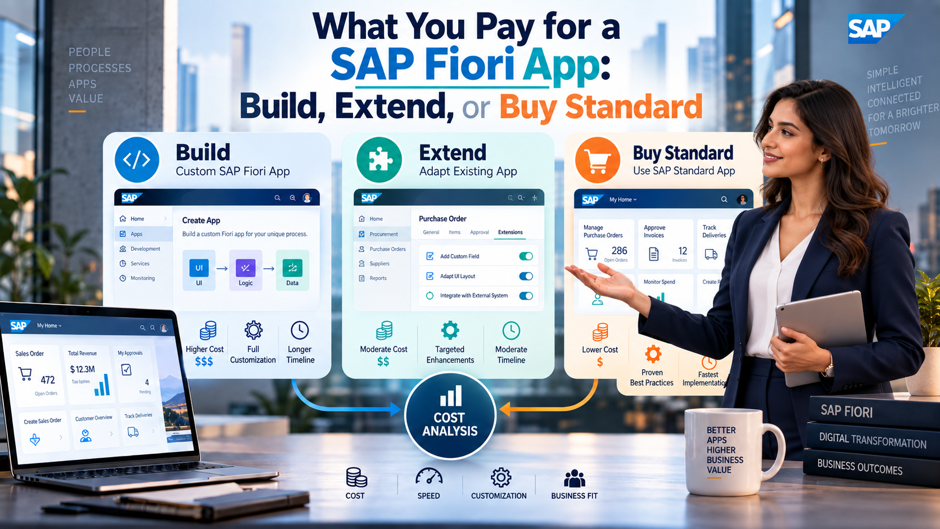
A procurement manager asks for 1 extra field and an approval note on the purchase requisition app. A functional consultant says it’s a couple of hours with the in-app adaptation tools, while an architect proposes a new custom app and sketches a project plan that runs for weeks. Both answers can be correct for different versions of the requirement, and the gap between them, often a factor of 10 or more in cost, comes from which of 3 paths the team takes: use the standard app, extend it, or build something new.
This post breaks down what each path costs across licensing, labor and the long tail of upgrades and support. Licensing terms are contract-specific, so sourced figures here are labeled and should be confirmed with SAP and your own order form, and the effort and cost numbers in the worked example are planning assumptions meant to be replaced with your team’s own estimates. The goal is a way to compare the 3 paths on total cost over several years instead of on the build quote alone.
TL;DR
- Standard apps are the cheapest path, and they’re usually covered by the user licenses you already own. Licensing advisors report that standard Fiori apps delivered with the S/4HANA application server fall under the named user license and the launchpad itself carries no separate charge, while the real costs are configuration, role assignment, security design and change management for the people using them.
- Extension and custom builds shift the bill from licenses to labor, upgrades and platform consumption. In-app adaptation costs hours, developer extensions cost days, and a custom app costs weeks plus a multi-year run cost, and side-by-side apps on SAP BTP can add launchpad service, Work Zone and consumption charges that standard apps never trigger on their own, which is why licensing review belongs in the design stage.
- Clean core choices decide the long-term price. SAP’s clean core levels A through D grade extensions by upgrade safety, so a cheap shortcut that modifies standard objects can turn into an expensive remediation project at the next upgrade, which makes 5-year cost a far better basis for comparison than first-year cost or the build quote alone, and it’s the lens the rest of this post uses throughout.
Why the Price of a Fiori App Is Never 1 Number
Asking what a Fiori app costs bundles together at least 4 separate questions. The first is licensing: does the app fall under the user licenses already in place, or does it require another entitlement. The second is labor: how many days of configuration, design, development and testing the requirement needs. The third is platform consumption, which applies when an app runs on SAP BTP instead of inside S/4HANA. The fourth is lifecycle cost, meaning the effort to keep the app working through upgrades, security patches and changing business rules for as long as the company uses it.
Most budget conversations focus on the second question, which is natural because labor is the part a project manager controls directly, because a build estimate is easy to write on a slide, while the other 3 hide in procurement terms and in the project’s own future. A custom app with a modest build quote can carry a larger bill over 5 years than a more expensive but cleaner design, because every upgrade requires regression testing and every platform dependency adds a line to a renewal. Comparing the 3 paths on the same 4 questions is the only way to see which 1 is actually cheapest for a given requirement.
Finance partners tend to appreciate this framing because it separates one-time costs from recurring ones, and it shows which line items scale with the number of users, which scale with the number of apps and which stay flat. A standard app scales mostly with training and support, a side-by-side app scales with platform consumption, and a custom app scales with the number of upgrades the company lives through, so the 3 paths age very differently on the same budget line.
A useful habit is to write down, for each path, the answer to all 4 questions before comparing totals. Teams that do this often discover that the cheapest-looking option on the build quote carries an unlisted licensing question, or that the most expensive-looking option removes a recurring cost, such as a manual workaround that employees repeat every week and that nobody has priced. The sections that follow walk through each path in that structure, then bring the numbers together in a worked example with clearly labeled assumptions, and close with decision rules, governance habits and the mistakes that most often inflate Fiori budgets.
The 3 Paths at a Glance
| Path | What You Get | Main Cost Drivers | Upgrade Exposure |
| Buy standard | A delivered Fiori app from the S/4HANA catalog | Configuration, role assignment, testing and user training | Lowest, since SAP maintains the app |
| Extend | A standard app adapted with key user tools, an adaptation project or side-by-side services | Consultant or developer days, plus BTP services for side-by-side designs | Low to moderate, depending on how clean the extension is |
| Build | A new custom Fiori app, typically with Fiori elements or SAPUI5 | Design, development, backend services, testing and long-term ownership | Highest, since the customer owns every dependency |
Reading the table from top to bottom shows a pattern that holds across projects and across company sizes: each step to the right in the build decision moves cost from SAP’s side of the ledger to yours. A standard app arrives maintained and upgraded by SAP, an extension makes you responsible only for the delta, and a custom app makes you responsible for everything. That doesn’t make custom apps a bad choice, since some requirements can’t be met any other way, but it does mean the burden of proof should rise with each step.
Path 1: Buy Standard
Standard Apps Are Generally Covered by Existing User Licenses Licensing advisors report that Fiori apps delivered as part of the S/4HANA application server are included in the named user license, that the Fiori launchpad doesn’t generate a separate fee, and that the cost was effectively embedded in the user type. Practitioner blogs make the same point, describing Fiori as included in the S/4HANA license fee and as a missed opportunity when companies keep using SAP GUI for transactions that standard apps already cover. Confirm the position against your own contract, but the default assumption for embedded standard apps is no incremental license charge.
The Real Costs Are Configuration, Roles and Adoption SAP publishes the Fiori apps reference library, which lists the available apps with their prerequisites and configuration details and doesn’t require any SAP product license to access. Activating a standard app means assigning the right roles in the front-end server, because a user without a role sees a blank launchpad with no tiles. Budget for the consultant time to activate and test apps, the security design for roles, and the training and communication that turn an installed app into a used app.
Old Price Tags Still Circulate and Deserve Skepticism When SAP first sold Fiori as a separate product, press coverage cited a price of $150 per user for a perpetual license, and the German-speaking SAP user group argued that Fiori belonged in standard maintenance. That figure still appears in some procurement articles alongside claims of 22% annual maintenance for premium Fiori apps. Treat those numbers as historical or unverified unless SAP names the specific app and product behind the charge, and ask for the quote in writing with the product name, the metric and the term, since some apps do depend on additional products and that dependency, not the Fiori interface, is what carries a price.
Path 2: Extend
- Key user adaptation handles simple UI changes at the lowest cost. Business experts and functional consultants can use in-app tools to add fields, rearrange sections, hide elements and rename labels without writing code, and one comparison rates the developer effort as low with no change to the SAP-delivered app, though capability depends on what each specific app supports.
- A SAPUI5 adaptation project suits developer-controlled changes to an app variant. Built in SAP Business Application Studio, an adaptation project overlays changes on the standard app without modifying it, and the same comparison rates the effort as medium to high, since a developer, a test cycle and a transport process are all involved, and the app must support adaptation for the approach to work.
- Developer extensibility inside the core stack adds logic through released extension points. ABAP developers use ABAP Cloud and the RESTful application programming model to add fields, validations and behavior on-stack, and SAP’s extensibility guidance describes key user, developer and side-by-side extensibility as available for both public cloud and on-premise editions, while the classic model remains an on-premise option only.
- Side-by-side extension on SAP BTP suits cross-system or independent functionality. These extensions run outside the core and connect through released APIs, which supports clean core goals and makes S/4HANA upgrades easier to plan, though they bring BTP runtime, launchpad and service consumption costs that on-stack extensions generally avoid, so the platform bill belongs in the comparison from the very first estimate.
- The least invasive option that meets the requirement is usually the cheapest over time. SAP community guidance recommends confirming which extension points the specific app supports, then choosing the lowest-impact approach, because each step toward heavier extension increases both the build effort and the number of things that can break during an upgrade, and teams rarely budget for the second part until the first upgrade arrives.
Path 3: Build
Building a new Fiori app makes sense when the requirement exceeds what standard apps and supported extension points can deliver, for example a custom approval workflow, an industry-specific operational app or a cross-system process that doesn’t map to any standard transaction. Teams typically build with SAP Business Application Studio, SAPUI5 or Fiori elements for the front end, supported by SAP Fiori tools and project templates that generate much of the boilerplate, and either RAP on the ABAP side or CAP with Node.js or Java on SAP BTP for the back end. The build is only the first line in the cost, since the customer owns design, security, testing, documentation and every future change.
Fiori elements is the main lever on build cost. A tutorial source reports that a list report with an object page, which might take 3 to 4 weeks to build in freestyle SAPUI5, takes 3 to 4 days with Fiori elements because the framework generates standard behavior from annotations, and a vendor blog claims savings of up to 80% on front-end development. Those figures come from educational and marketing sources and should be tested against your own estimates, though the direction is credible: template-driven apps cost much less to build and to maintain than freestyle apps with custom controls.
Backend work is the cost that estimates most often leave out, and it deserves a separate line in any SAP implementation quote. A custom app needs services to read and write data, whether that means CDS views and RAP business objects in the core or CAP services on BTP, and those services need authorization checks, error handling and performance testing. Teams should also budget for design time, since SAP’s design guidelines limit how far the interface can deviate from standard patterns, and for the project management and test coordination that surround any change to a system of record. Documentation and knowledge transfer deserve their own line, because a custom app that only 1 developer understands becomes a risk the day that person changes roles, and the cost of recreating that knowledge usually exceeds the cost of writing it down during the build.
Licensing Triggers That Change the Bill
| Trigger | Where It Shows Up | What to Check |
| Launchpad service on BTP | Fiori apps hosted on BTP and surfaced through a BTP launchpad | Advisors describe this as a separate entitlement with consumption pricing, so verify it in the order form |
| Work Zone deployment | Central access to Fiori content across systems | Described as a separately licensed product, though RISE bundles are reported to include a standard edition |
| BTP runtime and services | Custom apps built with CAP, plus services such as workflow, event or integration capabilities | Each service may draw on credits or capacity units, and usage grows with adoption |
| Digital Access documents | Custom apps that create sales orders, deliveries or invoices through APIs | Advisors warn of document-based charges in some designs, so confirm treatment with SAP before building |
| Additional products behind an app | Apps that require another SAP product or add-on | The charge belongs to the product, so check prerequisites in the Fiori apps reference library |
| User type mismatch | Users assigned apps outside the scope of their license type | Assign apps to users whose license covers the underlying function |
Several of these triggers come from licensing advisory firms rather than SAP, and a few, such as Digital Access exposure, depend heavily on contract language and on how a custom app is built and who uses it. The practical takeaway is to treat licensing as a design input: before committing to a side-by-side custom app, ask SAP and your licensing advisor to review the architecture against the contract, and record the written answer alongside the project’s architecture decision.
The Labor Side: Rates and Effort
Rates Vary Widely, and Published Figures Are Thin 1 market guide put the rate for experienced SAP BTP developers at $175 to $300 per hour as of March 2026, which works out to about $1,400 to $2,400 per 8-hour day. Rates for functional consultants, ABAP developers and UI designers differ by region, firm size and seniority, and offshore delivery changes the picture again, so use published rates as an order-of-magnitude check and replace them with the rates in your own statements of work as soon as you have them.
Effort Depends on the Path and on the Backend Key user changes typically take hours to a few days, including testing, because the tools are built for that. Adaptation projects take longer, since they involve a developer, a development environment and a transport through the landscape. A custom Fiori elements app typically takes days for the front end but more for services, authorizations, tests and documentation, and a freestyle SAPUI5 app multiplies the front-end effort. The honest range for a custom app is wide, and each estimate should name the backend work it includes, the number of screens and the authorization model it assumes, since small changes to any of those inputs can double the effort without anyone noticing.
Hidden Labor Sits in Testing, Design and Coordination Testing consumes more of a Fiori project than teams expect, because each app needs functional, role-based and regression testing across the browsers, devices and authorization profiles that real users bring. Design review, security review and change management add days that never appear in a developer’s task list, and project coordination adds more. A useful rule is to ask for a quote that itemizes build, test, design, security and project management separately so the build line isn’t mistaken for the total.
A Worked Example: 1 Requirement, 3 Paths
| Path | Assumed Effort | Build Cost at $1,400 to $2,400 per Day | Run Cost Over 5 Years | 5-Year Total |
| Extend with key user adaptation | 2 to 4 days | $2,800 to $9,600 | 0% to 5% of build per year, or $0 to $2,400 | $2,800 to $12,000 |
| Extend with an adaptation project | 8 to 15 days | $11,200 to $36,000 | 10% to 20% of build per year, or $5,600 to $36,000 | $16,800 to $72,000 |
| Build a custom Fiori elements app | 25 to 45 days | $35,000 to $108,000 | 10% to 20% of build per year, or $17,500 to $108,000 | $52,500 to $216,000 |
The effort days and run-cost percentages in this table are planning assumptions for illustration, not benchmarks from SAP or any survey, and the day rates come from the single market guide cited earlier. Licensing and BTP consumption are excluded, which favors the custom path, since a BTP-hosted app could add launchpad, runtime and service charges on top. The pattern matters more than the numbers: moving from key user adaptation to a custom app multiplies the 5-year total by roughly 18 to 19 times at both ends of the range, and a large share of that multiple comes from run cost and risk instead of the original build.
Clean Core and the Hidden Upgrade Bill
For Fiori budgets, SAP’s clean core approach is the main reason the cheapest build can become the most expensive extension. In 2025 SAP replaced its 3-tier extensibility model with a clean core level concept that grades extensions from A to D. Level A uses released APIs and extension points, either on-stack with ABAP Cloud or side-by-side on SAP BTP, and is described as upgrade-safe. Level B uses classic APIs that SAP recommends, level C uses internal APIs and carries more risk, and level D covers modifications, implicit enhancements and direct table access that SAP doesn’t recommend and that its code checks flag as errors.
The financial logic is straightforward. A level A extension survives upgrades with routine regression testing, while a level D extension may need to be reworked each time SAP changes the object it touched, and the remediation cost arrives as a surprise line in an upgrade project. Tools for custom code analysis, including SAP’s custom code migration app, can estimate the effort to bring existing code toward clean core, and some analyses now combine effort and return estimates so architects can price remediation before committing budget instead of discovering it later.
For a new Fiori requirement, the clean core lens produces a simple rule. Prefer standard apps, then key user adaptation, then released extension points, then side-by-side apps that use released APIs, and treat any approach that touches standard objects directly as a last resort that needs an approved exception. Following that order keeps most requirements at the low-cost end of the worked example and reserves custom builds for cases where nothing cheaper works, which is also where the larger run cost can be justified by business value. Teams that adopt this ordering as a written standard also find that arguments about individual requests get shorter, since the conversation moves from preference to a shared checklist that everyone has already agreed to follow.
Decision Rules: When to Pick Each Path
- Pick standard when an app already covers most of the process, as a rule of thumb at least 80%. Run a fit-to-standard session with the business, use the Fiori apps reference library to confirm prerequisites, and treat the remaining gap as a change management question before it becomes a development request, since users often adapt happily once a cleaner standard flow is explained and the old habits from SAP GUI are acknowledged.
- Pick key user adaptation for field, layout and label changes. If the requirement is to show, hide, rename or add a field the app already supports, an in-app change costs hours instead of days and carries the lowest upgrade exposure, so make it the default answer to small requests and document each change for governance, including who requested it, who approved it and which app version it applies to.
- Pick an adaptation project or on-stack developer extension for logic the standard app can’t hold. Validations, calculated fields and behavior changes that use released extension points justify developer time, and they keep the app on SAP’s upgrade path as long as the extension stays at clean core level A, which also keeps the regression testing burden at upgrade time predictable and modest.
- Pick a side-by-side app for cross-system or independent functionality. When the process spans systems, serves external users or needs its own lifecycle, building on SAP BTP with released APIs keeps the core clean, and the cost of BTP services should be modeled upfront instead of discovered at renewal, ideally with a written confirmation from SAP about launchpad, runtime and document-related charges.
- Pick a custom build only when the cheaper paths fail a documented test. Require a short written case showing which standard apps, extensions and side-by-side options were evaluated and why each fell short, plus an owner, a support model and a retirement date, so the custom app carries its true lifecycle cost from the start and doesn’t become an orphan once the project team moves on.
Governing a Fiori Portfolio
Keep an Inventory of Every Custom and Extended App The easiest way to lose control of Fiori cost is to lose track of what exists. An inventory listing each custom app and extension with its owner, path, clean core level, BTP dependencies and last test date gives finance and architecture a shared view, and it turns an upgrade project from a discovery exercise into a planned one. Update it as part of the change process so entries stay current without a separate cleanup effort.
Review Cost and Usage on a Schedule Apps that cost money to maintain and that few people use are the clearest savings opportunity. A quarterly review comparing usage, support tickets and platform consumption against the original business case identifies candidates for retirement or replacement by newer standard apps, since SAP keeps adding standard capability and a custom app built 3 years ago may now duplicate something that SAP maintains for free.
Make Licensing and Clean Core Part of the Design Review A design review that asks 4 questions, which path is this, what license or entitlement does it touch, what clean core level will it hit and who owns it after go-live, catches most expensive surprises before development starts. Including a licensing reviewer for any side-by-side app, and an architect for any app that creates documents through APIs, keeps costs visible while they’re still cheap to change, and it gives procurement a seat at the table before a commitment is made instead of after the invoice arrives.
Common Mistakes
Comparing build quotes without comparing lifecycle cost is the most common mistake. A custom app that costs 3 times as much as an extension to build can cost far more over 5 years, because the customer owns every upgrade test and every dependency, while an extension that touches standard objects can look cheap until the first upgrade project prices the rework. Asking every proposal to show a 5-year total with the same assumptions makes the comparison honest.
Assuming that licensing is settled at the Fiori interface is the second mistake. The launchpad and embedded standard apps are generally covered, but BTP-hosted apps, central launchpad services, Work Zone, runtime consumption and document-creating APIs can each add a charge or a contract question. Teams that discover this after building a side-by-side app face the awkward choice between paying and redesigning, so the licensing review belongs before the build, not after the demo.
Skipping the requirement challenge is the third mistake. Many custom Fiori requests reflect habits from SAP GUI, such as a screen that mirrors an old transaction layout, and a conversation with the business often reveals that a standard app plus a small adaptation around the purchase order process delivers what the process actually needs. A short fit-to-standard session at the start of every request costs a few hours and regularly saves weeks, which makes it the highest-return step in the whole approach, and it builds a habit of challenging requests early while the cost of changing direction is still close to zero.
FAQs
Are standard SAP Fiori apps free with S/4HANA?
Licensing advisors report that standard Fiori apps delivered with the S/4HANA application server fall under the existing named user license, and the launchpad itself carries no separate charge. Some apps depend on additional SAP products, and BTP-hosted launchpad or Work Zone services are separate. Confirm the position against your own contract and the prerequisites listed for each app in the Fiori apps reference library.
Does the $150 per user Fiori price still apply?
That figure comes from early press coverage of Fiori as a separately sold product, when user groups argued it belonged in standard maintenance. It still circulates in some procurement articles with a 22% maintenance claim for premium apps. Treat it as historical or unverified and ask SAP to name the specific product and charge behind any request for additional license fees.
What’s the cheapest way to add a field to a standard Fiori app?
Key user adaptation is usually the cheapest path, since business experts and functional consultants can add supported fields, rearrange sections and rename labels with in-app tools and no code. Capability depends on the specific app, so verify what it supports first. When the app doesn’t support the change, an adaptation project or released extension point is the next step up in cost.
When does a custom Fiori app make sense?
A custom app makes sense when standard apps and supported extension points can’t meet a documented requirement, such as a custom approval workflow, an industry-specific operational process or a cross-system app with its own lifecycle. Require a written case showing what was evaluated, plus an owner, a support model and a 5-year cost view, because the customer owns every upgrade and dependency.
How much does it cost to build a Fiori app?
It depends on scope, backend work and delivery rates. A market guide put experienced SAP BTP developer rates at $175 to $300 per hour in March 2026, and effort for a custom Fiori elements app can run from a few weeks to a few months once services, testing and design are included. Use the worked example as a template, replace the assumptions with your own estimates and itemize build, test, design, security and project management so the total reflects the whole effort across every role involved in the project.
Do side-by-side apps on SAP BTP cost more than on-stack extensions?
They can, because BTP-hosted apps may trigger launchpad service, Work Zone or runtime consumption charges that embedded extensions generally don’t, and those charges tend to grow as more users adopt the app. Side-by-side designs bring benefits in decoupling and clean core alignment, and they suit cross-system or independent functionality. Model platform costs upfront and ask SAP to review the architecture against your contract before committing to a build.
What does clean core mean for my Fiori costs?
Clean core determines how much extensions cost to keep. SAP’s level A through D model grades extensions by their use of released APIs, with level A upgrade-safe and level D covering modifications that SAP doesn’t recommend. Extensions at level A usually need routine regression testing at upgrade time, while level D extensions can require rework, so the clean core level is a direct predictor of future spend.
How do I stop Fiori costs from growing over time?
Keep an inventory of every custom and extended app, review usage and platform consumption quarterly, retire apps that standard capability has replaced and include a licensing and clean core check in every design review. Most cost growth comes from apps nobody revisits, so a scheduled review that asks whether each app still earns its run cost is the most dependable control.